No technology has transformed daily life as much since the 1990s.
The share of the population with Internet access doubled between 2014 and 2025, reaching 73.2% of the world population in October 2025. The Internet is a network used by more than 6 billion people, but how it works is still opaque to many.
The Internet is the network that connects devices to each other. The web (World Wide Web) is only one of the services that run on the Internet, alongside email (SMTP) or file transfer (FTP).
The web is a collection of pages accessible with a URL that starts with HTTP. This abbreviation refers to a protocol (HyperText Transfer Protocol) that standardizes how computers communicate on the web.
In this article, we will mainly use the web as an example to illustrate how the Internet works.
Accessing the Internet
Devices have three ways to access the Internet (Wi-Fi, Ethernet, 4G/5G). The process is slightly different for each method.
Wi-Fi
From a fixed location, accessing the Internet requires a home router (an Internet box). A box typically contains:
- The modem. It converts digital data from the device into radio waves to send to the server.
- The router. It manages traffic and directs data between devices by assigning IP addresses and handling routing.
Each Wi-Fi-capable device has a Wi-Fi card. This card receives the radio waves emitted by the box.
The card and the box are transmitters/receivers configured on the same frequencies (2.4 GHz or 5 GHz). To receive signals from other devices, a device must be on the same frequency to exchange information.
Frequency measures how many repetitions per second a wave has. It is measured in Hertz. For the Internet, these are considered low frequencies. The higher the frequency, the shorter the range. For example, 5 GHz Wi-Fi is faster but has a smaller coverage area.
Going further: beacons
Routers emit beacons by radio waves. Every 0.1 seconds, a beacon is sent to Wi-Fi cards to detect the network.
This almost permanent connection allows the device to measure the strength of the received beacon, which displays the signal quality with connection bars.
Each device has a maximum number of megabits per second it can handle, which allows the router to adapt to different device generations.
Beacons are encoded in binary (content made of 0s and 1s. For example, the letter A in binary is 01000001). They are transmitted as radio waves. To transmit binary information, the components of the wave are modified.
The 0s and 1s become easily distinguishable, which allows the device to properly decode the received information.
5G
Without access to a Wi-Fi network, mobile data takes over and keeps you connected to the Internet.
Each phone has a modem, which enables both calls and mobile data. Not all modems are compatible with 5G by default. 5G uses new frequencies, especially to handle increased traffic. 4G modems cannot process these new frequencies.
The modem detects nearby 5G cell towers. Each tower continuously broadcasts a "beacon signal" that contains identification information: the operator, the network type (5G, 4G, 3G), signal strength, etc.
The SIM card provides authentication and allows the device to use authorized operators. Even if several towers are available, the modem chooses the best one.
The range of cell towers depends on the frequency used. With low frequencies (700 MHz), towers can work up to 15 km in rural areas, compared to 3 km in cities because of obstacles. The higher the frequency, the shorter the range. Mid-band 5G towers have a range of 400 m to 1.2 km.
Unlike Wi-Fi, the IP address is public in 5G. Now that the device is connected to the Internet via Wi-Fi or 5G, let's see how the network operates.
IP address
The Internet relies on IP addresses. Like a physical address, it tells where to send and receive information.
A Wi-Fi network gives access to several devices and assigns a private IP address to each device.
Online, requests come from a public IP address, which is the router's address. The server never knows which device made the request thanks to NAT. NAT (Network Address Translation) transforms a public IP address into a private IP address and vice versa.
To better understand NAT, it helps to distinguish three types of addresses:
- Public addresses visible on the Internet
- Private addresses used in the local network. Inside the router, a DHCP (Dynamic Host Configuration Protocol) server assigns this private address.
- Local addresses internal to a machine (127.0.0.1)
When a computer sends a packet to Wikipedia:
- The packet leaves with source IP: 192.168.1.42.
- The router intercepts it and replaces it with a public IP: 192.168.1.42 -> 86.210.x.x (its public IP). It also assigns a unique port (e.g., 12001).
- The router keeps a record: "192.168.1.42 made this request on port 12001".
- Wikipedia responds to port 12001.
- The router forwards it to the source IP 192.168.1.42.
Without NAT, multiple devices could not share the same Internet connection.
Reaching the servers
The simplest example is a user visiting Wikipedia. When clicking a Wikipedia page, a user sends a request to a Wikipedia server (which you can think of as a computer). In return, the server responds to the device. This communication happens in packets, which we will detail later.
These packets travel through several steps. A home router (or a 4G/5G antenna) is connected to an optical fiber that links to the requested server. Packets travel hundreds or even thousands of kilometers through fiber optic cables until they reach the server. The server processes the request and sends a response that travels back along the reverse path.
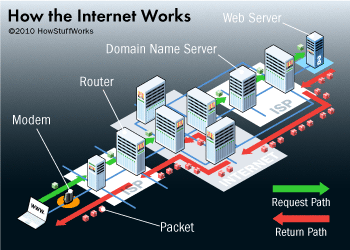
This path is paradoxically very fast despite the distance. Servers can be on the other side of the world, yet those thousands of kilometers are covered in just a few seconds.
The sending device sends the request to the home router. The router must now reach the servers.
Packets
Communication between devices and servers happens in packets. When clicking a Wikipedia page, a packet is sent to the server. It contains:
-
A header
- The source IP address
- The destination IP address
- Sequence numbers
- The transport protocol
- The packet length
-
The content (payload)
GET /wiki/Tour_Eiffel HTTP/1.1
Host: fr.wikipedia.org
User-Agent: Mozilla/5.0 (iPhone; CPU iPhone OS...)
Accept: text/html,application/xhtml+xml...
Accept-Language: en-US,en;q=0.9
Accept-Encoding: gzip, deflate, br
Cookie: []
Connection: keep-alive
Packets are used for both requests and responses. The request is relatively small, while the server's response is larger. The response loads all the necessary code (including files in programming languages such as HTML, CSS, JavaScript) as well as images and videos.
A packet can contain at most 1500 bytes. To load a complete 2-megabyte Wikipedia page, the response includes more than 1400 packets.
Packets do not necessarily arrive at the same time, which is why a web page can load progressively.
TCP or UDP
Packets are sent using protocols. Two protocols are used.
Transmission Control Protocol (TCP) guarantees that data arrives in order and without loss. TCP creates a 3-step connection called the three way handshake between the device and the server.
- SYN (Synchronize)
- SYN-ACK (Synchronize-Acknowledge)
- ACK (Acknowledge)
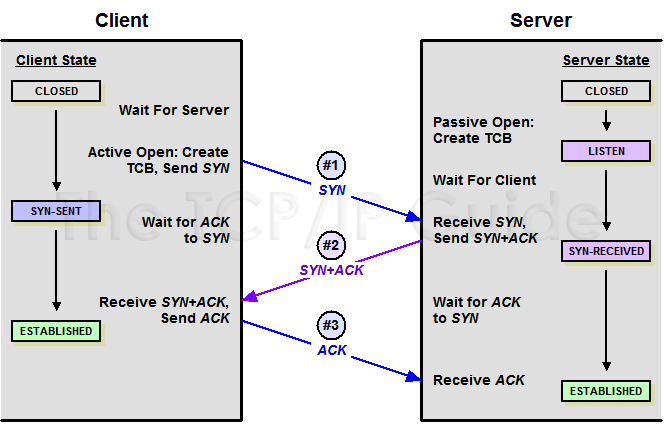
The connection between the device and the server is established, and the page can be displayed. Most web pages use this protocol, like this article.
The User Datagram Protocol (UDP) is simpler than TCP. UDP is used for faster needs, such as video streaming. To be faster, UDP does not establish a prior connection (no three way handshake).
Unlike TCP, packet order is not verified by the protocol. If a packet is lost, UDP does not resend the missing packet. For example, glitches during a video call are due to these packet issues that UDP does not manage.
DNS
When searching for www.google.com, a DNS server translates this domain name into an IP address. Searching by IP would work too, but it is easier to remember google.com than 11 digits.
The IP address 142.250.185.78 allows access to google.com.
There are many DNS servers. Internet service providers (ISPs) manage DNS servers by default. Other public DNS servers exist, such as Cloudflare (1.1.1.1) and Google (8.8.8.8).
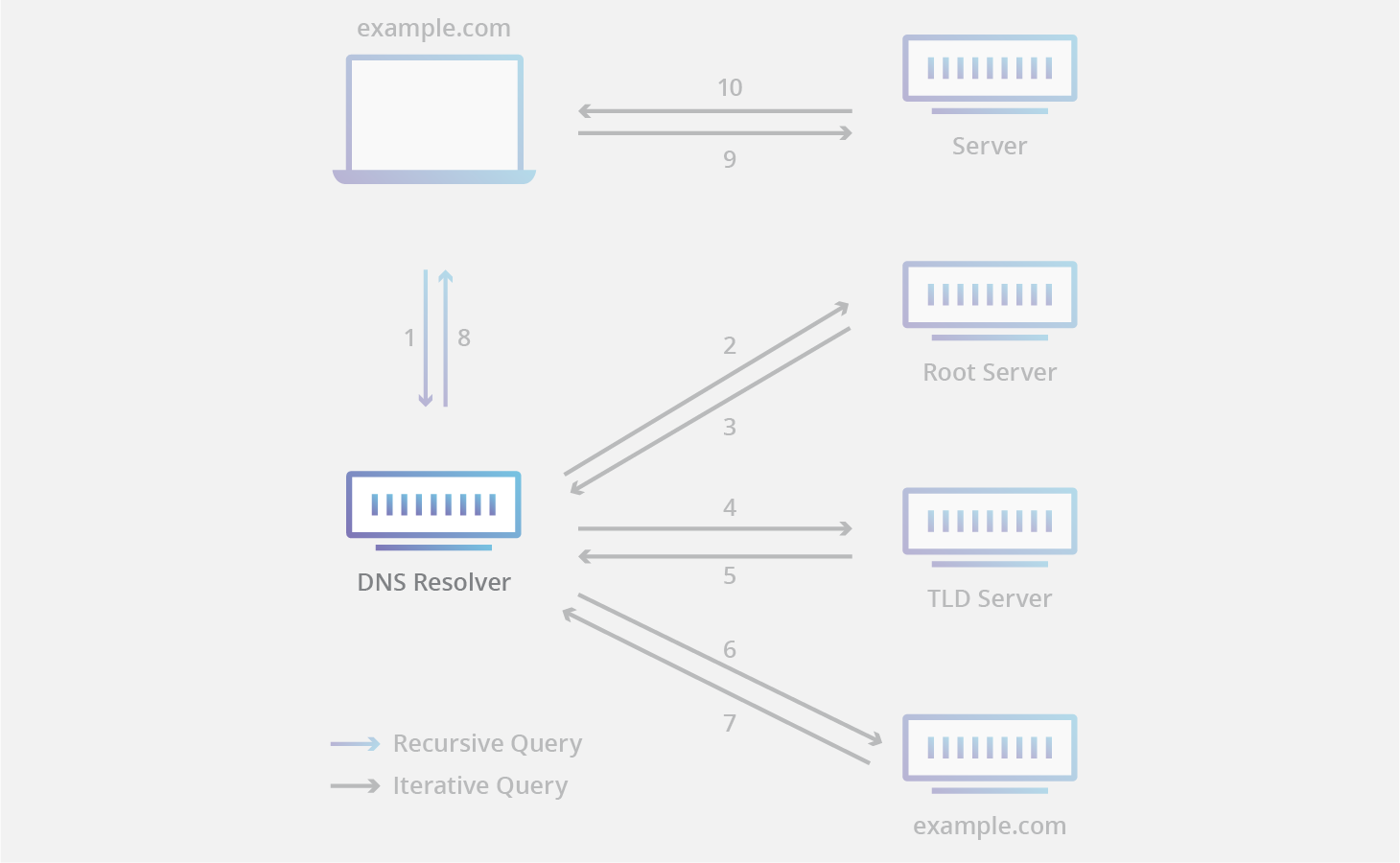
When visiting a Wikipedia page, four types of DNS servers are needed.
-
The recursive resolver checks whether the requested IP address is in memory (its cache). If not, it queries a root server. It can be located in the router to reduce response time.
-
The root server has 13 IP addresses in memory that can locate domain extensions (.com, .net). The server chooses one of these addresses based on average response time or availability. These 13 IP addresses point to hundreds of physical servers around the world.
-
The root server queries the Top-Level Domain (TLD) server that manages domain extensions. Each TLD server is managed by the entity that owns the extension (Verisign for .com, AFNIC for .fr). This server provides the addresses of authoritative name servers for the domain.
-
The authoritative name server returns the information specific to the domain name, especially the IP address.
Now the device has the correct URL IP address.
Routing
How does a packet find its path among billions of connected devices?
Like highways, each interchange (router) has a sign that says "To get to New York, take exit 3". These signs update in real time depending on traffic.
A router does not know every possible path. It only knows:
- Its immediate neighbors
- The networks it can reach
- The "distance" (number of hops) to those networks
When a packet arrives, the router looks at its routing table and sends it to the "closest router" to the destination.
Border Gateway Protocol (BGP)
Protocols like BGP (Border Gateway Protocol) allow routers to exchange this information continuously. The path taken is not necessarily the same between two packets.
For example, a user accesses Google via IP address 142.250.185.78. Step by step, the packets arrive at a Google data center router, which ultimately forwards them to the server that owns the IP address. No router knows the full path of the packet; the path is built router by router.
Fiber optics
To deliver packets to servers, fiber optics connect networks over long distances.
Equipment (your box, a router) sends an electrical signal to an optical transmitter. A laser or LED sends the request content in binary. Light travels very fast (299,792,458 m/s), which enables long-distance travel. Although fiber is slightly slower (about 70% of the speed of light), it still enables long distances efficiently.
Fiber contains a very thin strand, made of silica glass or plastic. Light travels in this part thanks to a physical phenomenon called total internal reflection (TIR).
Total internal reflection
When light passes from one medium to another, such as water, certain behaviors occur. Light can reflect on some surfaces, or refract, meaning it passes through while changing direction.
Under certain conditions, light can be fully reflected, like a mirror effect when looking almost parallel to the water surface. By reproducing this angle, light is almost totally reflected, which allows the light signal to be transmitted.
This phenomenon makes the light signal zigzag millions of times until it reaches the server. The light is reflected on an optical cladding that surrounds the strand. Very thin (125 micrometers), it keeps the light inside the core.
Over long distances (every 80-100 km), optical amplifiers regenerate the signal that naturally weakens.
When the request arrives:
- A photodiode captures the light
- It converts it into an electrical signal
- Electronic circuits decode the pulses into digital data
- The device receives the data packets
To cross continents, fiber optic cables are integrated into undersea cables. They are then buried in the seabed.
Historically managed by telecom operators, the GAFAM (Google, Amazon, Facebook, Apple, and Microsoft) increasingly own undersea cables.
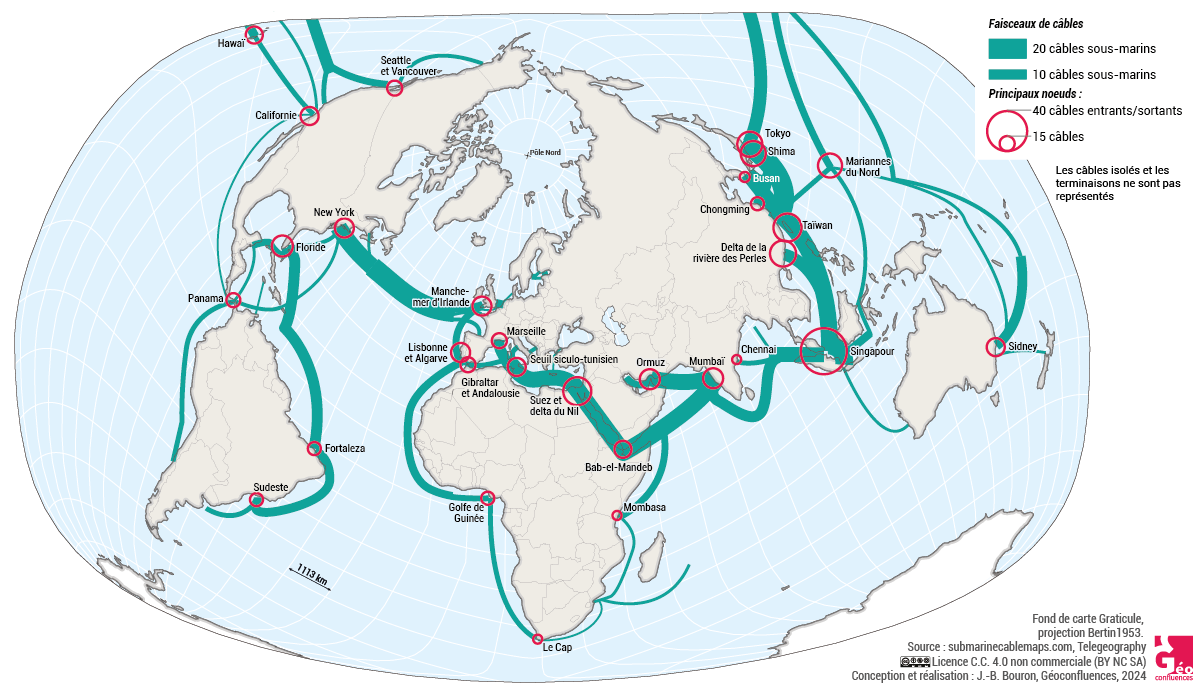
Latency (ping) measures the time required for a packet to make a round trip. Ping varies depending on the server location. When devices and the server are in the same place, ping is under 5 milliseconds (ms) versus about 73 ms between Paris and New York.
The future of the Internet
With its billions of daily users, the Internet has proven itself. Even with near-instant ping, some use cases require immediate latency.
The French government has already announced the creation of a "France 6G" platform to prepare the arrival of the network around 2030. 6G should be 100 times faster than 5G and will enable new use cases, such as real-time holography or tele-surgery.
Accessing the Internet by satellite
In remote areas, Starlink allows people to connect to the Internet. Laying cables for a single home is expensive, so satellites are an alternative.
As with a home router, the device connects to the network. An outdoor antenna communicates by radio with the satellites.
A constellation of 6,750 satellites in low Earth orbit (550 km altitude) orbits the Earth to operate the network.
With satellite trajectories, the network is relayed by lasers. As with fiber optics, a light signal transmits the packets.
To reach the server, satellites send packets to ground stations (called gateways). These stations connect to the "classic" Internet via fiber optics.
Starlink ping is between 30 and 80 ms, which is longer than fiber optics (5-20 ms).
The Internet and CO2
The Internet also contributes to greenhouse gas emissions. In France, 4.4% of greenhouse gas emissions are linked to digital technology. However, these emissions do not mainly come from the network itself, but from devices (50%) and data centers (46%) that host servers.
The network represents 4% of the greenhouse gas emissions linked to digital technology, largely because of the infrastructure needed (cables, fiber optics, etc.).
However, growing Internet usage is increasing projections of greenhouse gas emissions linked to the Internet. Overall, emissions linked to digital technology are expected to triple by 2050.
Every page visited on the Internet is a long, invisible journey. In this article, we saw how devices connect to Wi-Fi and how packets are exchanged between servers and devices with a ping almost as fast as light.
Thank you for reading this article. A glossary summarizes the technical concepts discussed.
Glossary
IP address: unique identifier assigned to each device connected to the Internet (e.g., 192.168.123.132).
Beacons: signals emitted by routers to detect and maintain Wi-Fi connections with devices.
Wi-Fi card: hardware component that allows a device to connect to a Wi-Fi network.
DHCP: Dynamic Host Configuration Protocol, a protocol that automatically assigns IP addresses to devices connected to a network.
DNS: Domain Name System, the system that translates domain names (like google.com) into IP addresses.
Ethernet: wired networking technology that connects devices to the Internet via a cable.
ISP: Internet service provider (e.g., Orange, SFR).
Handover: process that lets a phone switch automatically from one cell tower to another to maintain the best connection.
HTTP: HyperText Transfer Protocol, the communication protocol used on the web to transfer data.
Internet: the global network that connects devices to each other.
IP: Internet Protocol, the protocol that defines the format of IP addresses and enables routing of data packets on the Internet.
Modem: component that converts digital data into radio waves (or electrical signals) for transmission and converts received signals into digital data.
NAT: Network Address Translation, a protocol that transforms a public IP address into a private IP address and vice versa, allowing multiple devices to share a single public IP address.
Packets: data units into which information is divided to be transmitted over the Internet.
Ping: latency, a measure of the time needed for a packet to make a round trip between two points.
Recursive resolver: DNS server that checks its cache first before querying other DNS servers to find the IP address for a domain name.
Router: component that manages network traffic and directs data between devices and the Internet by assigning IP addresses and routing traffic.
Authoritative name server: DNS server that contains the official information for a specific domain, including its IP address.
Root server: top-level DNS server that contains the IP addresses that locate domain extensions (.com, .net, .fr, etc.).
TCP: Transmission Control Protocol, a protocol that guarantees data arrives in order and without loss.
Three way handshake: three-step process (SYN, SYN-ACK, ACK) used by TCP to establish a connection between a device and a server.
TLD: Top-Level Domain, a domain extension (like .com, .fr, .net).
UDP: User Datagram Protocol, a simpler, faster protocol than TCP, used for video streaming.
Web: World Wide Web, the collection of pages accessible on the Internet via HTTP URLs, like Wikipedia.
Sources
Internet penetration worldwide from 2014 to October 2025
YouTube - How Wi-Fi actually works par The Default guy
Coursinfo.fr - Comment ça marche Internet ?
Géoconfluences - Câbles sous-marins
Cloudflare - Types de serveurs DNS
Wireshark Wiki - TCP 3 way handshaking
Checkpoint - Qu'est-ce que TCP/IP ?
Wonder Network
ADEME : quel impact environnemental en 2022 ?
ARCEP - Parlons 5G : toutes vos questions sur la 5G
NSI Renoir - Système sur puce
HowStuffWorks - How Internet Works
Starlink - Technologie
France 2030 : Réseaux du futur et France 6G
vas-y, viens, on recrée TOUT internet... de zéro - V2F